Android TV · Shield · Plex

A living-room
player for your library.

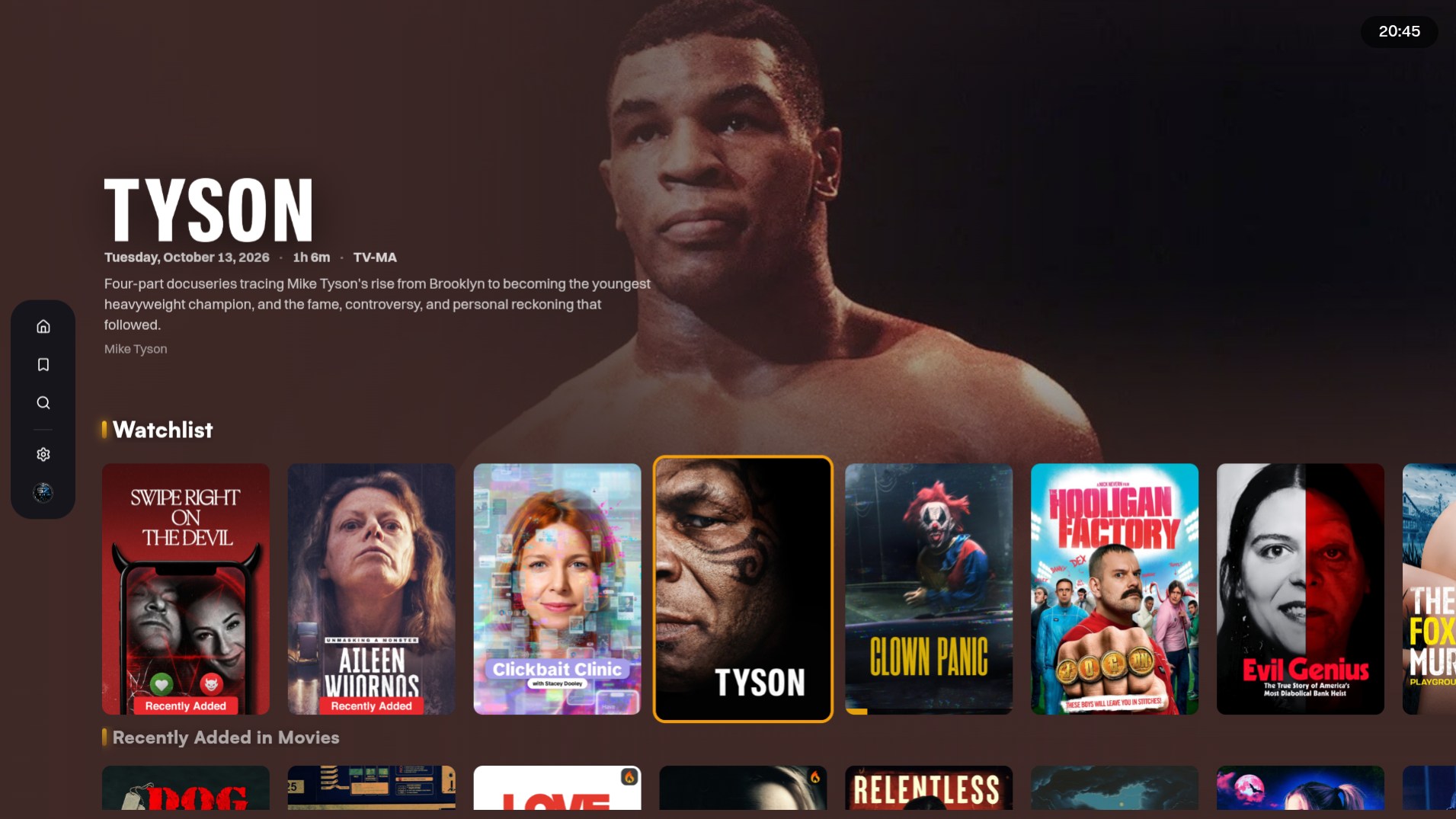
StreamPilot on the big screen. Sign in with Plex, pick who’s watching, and play from your libraries: Direct Play, subtitles, and a D-pad home. It is not a streaming store.

D-pad first ExoPlayer Plex Direct Phone app WIP
StreamPilot on Android TV
Features

Everything the sofa actually needs.

Remote-first on Android TV and Shield. Sign in with the Plex account that already owns your libraries. Nothing else to set up.

Direct Play

Native ExoPlayer. Prefer the original file, keep HDR when the display can, and fall back to HLS when a TV cannot bitstream TrueHD or DTS.

HEVC H.264 AV1 Dolby Vision E-AC3

Who’s watching

Plex Home profiles and PIN on launch. Switch people without reinstalling. Kids stay on their own Continue Watching.

Built for the remote

LEANBACK on Shield and Android TV boxes. D-pad rows, a TV clock, search keyboard, and focus that stays where you left it.

Make Home yours

Heart the libraries you want on Home. Reorder the sidebar. Hide watched from Recently Added. Sort Continue Watching your way.

Title pages

Movies, shows, seasons, and episodes with Play, Resume, versions, audio and subtitle chips, extras, trailers, and Top Cast.

People and studios

Open an actor and see what they have on this server. Browse a studio plate and play from there.

Libraries and music

Browse A-Z, collections, and studios. Artists, albums, and tracks play through the same player with a now-playing chip.

Watchlist and playlists

Add titles from a title page. Home can show Watchlist, playlists, and Because You Watched, or you can turn those rows off.

Skip intro and credits

Off, on-screen prompt, or auto. Autoplay the next episode, or ask Still watching? after a run. Cinema trailers before a movie if you want them.

In the player

Chapters, seek thumbs, speed, zoom, A/V delay, sleep timer, night mode, match frame rate, OpenSubtitles, and a stats overlay on long-press OK.

Watch Together

Share a room code from Settings. Friends sync playback on the same library. The media never leaves your server.

Screensaver

After idle, cycle art from Continue Watching, Watchlist, recents, unwatched, or random. The nav hides until a key wakes it.

Phone app

The living-room player is what we are shipping. A touch Android app is in the same project and still a work in progress. Watch this space.

WIP Android Same Plex login

Playback

Codecs, HDR, and quality.

What ExoPlayer Direct Plays, what gets burned in, and the quality ladder when the original file will not go through.

Video

  • HEVC / H.265, H.264, AV1, VP9
  • Up to 4K, progressive or interlaced
  • Dolby Vision, Dolby Vision HDR10, HDR10+, HDR10, HLG
  • Match display refresh rate to the file (on by default)

Audio

  • Direct Play: AC3, E-AC3
  • Optional HDMI passthrough: TrueHD, MLP, DTS / DTS-HD
  • Decoded tracks: AAC, FLAC, Opus, MP3
  • Passthrough off (default): TrueHD / DTS transcode instead of bitstream
  • Night mode; transcode audio boost 100 / 200 / 300%

Subtitles

  • Text Direct Play: ASS, SSA, SRT, WebVTT
  • Burned by the server: PGS, VobSub, DVB, XSUB, other image tracks
  • Burn policy: auto, image only, or always
  • Mode: off, forced, always
  • Size, colour, background, position, delay, voice-activity auto-sync
  • OpenSubtitles search from the player

Quality

  • Original file (Direct Play when eligible)
  • 1080p at 20 / 12 / 8 Mbps
  • 720p at 4 / 2 Mbps
  • 480p at 1.5 Mbps, 360p at 0.7 Mbps
  • Separate remote quality when you are away from home
  • Optional auto step-down if the stream keeps buffering
Settings

Everything you can change.

TV Settings tabs, plus a few that live in the in-player menu (long-press while watching).

Home

  • Show Continue Watching
  • Continue Watching sort: latest release, Plex On Deck, recently watched, title
  • Watchlist row
  • Playlists row
  • Because You Watched
  • Hide watched from Recently Added
  • Season posters on Recently Added TV
  • Reorder libraries in the sidebar
  • Heart which libraries appear on Home

Playback

  • Autoplay next episode
  • Still watching? after 0, 2, 3, 4, 5, 6, 8, or 10 episodes
  • Default quality and remote quality
  • Auto quality on repeated buffering
  • Skip intro: off, prompt, auto
  • Skip credits: off, prompt, auto
  • Cinema trailers before a movie (0 to 5)
  • Match frame rate
  • In player: rewind on resume 0 / 5 / 10 / 15 / 20 / 30s, speed 0.5x-2x, zoom, chapters, repeat, sleep timer, A/V delay, stats overlay

Audio and subtitles

  • Preferred audio: English, Spanish, French, German, Italian, Portuguese, Japanese, Korean, Chinese, Russian, Dutch, Polish, Swedish, Norwegian, Danish, Finnish, Arabic, Hindi, Turkish, or track default
  • HDMI passthrough
  • Night mode
  • Subtitles: off, forced, always
  • Size 50% to 200%
  • Colour: white, yellow, blue
  • Background: none, dim, solid
  • Position: bottom, middle, top
  • In player: burn auto / always / image, delay ±5s, auto-sync, audio boost

Display

  • Reduce motion
  • Tint title pages from the backdrop
  • 24-hour or 12-hour clock
  • Date format (long, day-first, ordinal, weekday, short, numeric DMY / MDY, ISO)
  • Row marker: play, bar, dot, ring, diamond, square, star, chevron, bolt, or none
  • Studio / network logos and plates
  • Resolution and codec pills on episodes
  • Watched tick: any poster corner
  • Theme tunes
  • Quiet trailer behind title artwork
  • Skip the season page when a show has one season
  • Hide unwatched episode stills on chosen shows (spoilers)

Screensaver

  • Art from: Continue Watching, Watchlist, recommended, trending, popular, new releases, recently added, most watched, unwatched, or random
  • Shift the clock each slide for OLED

Account

  • Sign in automatically on this TV
  • Which Plex servers to show, if you have more than one
  • Watch Together relay URL
How it works

Install. Sign in. Play.

01

Get the app

Install StreamPilot from Google Play on a Shield, Android TV box, or living-room display. The phone app is a work in progress.

02

Sign in with Plex

Use your Plex account. PIN login, pick who’s watching, heart the libraries you want on Home.

03

Watch

Direct Play from your Plex servers. Continue Watching, search, and a remote that actually behaves.

Preview

Designed for the sofa.

Home, libraries, browse, search, titles, people, sign-in, and Make Home yours, captured on Android TV.

FAQ

Common questions

For Play reviewers, household members, and you with a remote in hand.